

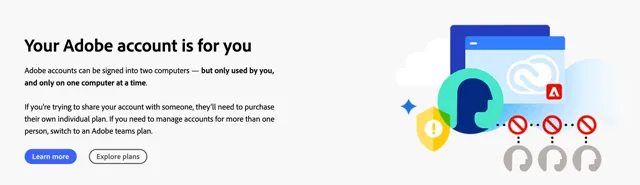

Adobe is tightening its rules around account sharing and making it clear that one subscription is meant for one user, no exceptions. For video editors, production teams, and freelancers who rely on the Creative Cloud ecosystem, this shift brings new layers of enforcement, stronger monitoring, and more immediate consequences when login behavior violates terms. Below, we break down what Adobe changed, why it matters, and how creators can adapt without friction.
Why Adobe Is Cracking Down on Account Sharing
Over the past few years, subscription sharing across creative teams has become increasingly common. A single account might be used across multiple edit bays by several freelancers or even external contractors.
Adobe considers this both a security problem and a licensing breach. The company has also invested heavily in cloud workflows—Creative Cloud Libraries, Firefly, and shared project syncing—which means unauthorized access compromises user data and system stability.
Beyond security, Adobe’s business model depends on individual licensing, and tightening enforcement aligns with the wider SaaS trend of discouraging password sharing, similar to what streaming platforms rolled out in recent years.
What the Restrictions Look Like
Adobe has introduced both technical and policy changes designed to minimize shared-use patterns.
Reinforced Terms of Use
Adobe updated its Terms of Use, ensuring the language explicitly says single-user licensing. Account credentials cannot be shared with anyone, including coworkers or clients. Even in collaborative environments, each contributor needs their own license or a seat under a Team or Enterprise plan. The company has placed this notice more prominently within Creative Cloud and during sign-in, indicating a stronger emphasis on compliance.
Device and Login Limit Enforcement
Adobe already allowed activation on two devices per account, but users could exploit loopholes by staying logged in on multiple machines through cloud syncing.
The new enforcement ensures an account is active at a single device at a time. It detects multi-location usage, forces logouts, and even blocks access when behavior suggests multiple users are sharing a subscription.
Some creators have already reported being kicked out of Adobe apps mid-session when limits are exceeded.
AI-Driven Behavioral Monitoring?
Because many Creative Cloud tools now run partially in the cloud, Adobe could analyze usage patterns more accurately than before. Access from multiple IPs, unusual download or syncing frequency, or Firefly prompts coming from different devices simultaneously may trigger compliance monitoring.
This doesn’t mean Adobe is reading your files; rather, they may be tracking whether a single account behaves like multiple humans using it at once.
How These Changes Affect Video Editors and Production Teams
Video creators are among the most impacted because collaborative editing often involves multiple machines and rapid transitions between workstations.
Multi-Seat Teams and Studios
Small studios that previously relied on one shared login will face the biggest workflow changes. Adobe now expects creative businesses to use Team or Enterprise plans designed for multi-seat access —what they should’ve done from the start. These plans include shared libraries, centralized billing, admin controls, and proper rights management, features that align with how most video departments operate anyway.
Freelancers Working Across Devices
Independent editors who bounce between a desktop workstation, a laptop on-set, and a mobile device for quick adjustments may be forcefully logged out if they exceed the activation limits. The rule remains the same—two devices at a time—, but enforcement is now stricter. Deactivating unused devices regularly will now be part of good practice.
Cloud Libraries and Shared Assets
Collaborative Premiere Pro and After Effects projects often involve shared media, but Adobe now monitors how those assets are accessed. If cloud-stored footage or templates appear to be pulled by multiple users logged into the same account, this may be flagged. Teams should transition to proper shared libraries under a multi-seat setup to avoid interruptions.
Consequences for Violating the Updated Rules
Adobe has outlined several steps it may take when sharing is detected. Users may receive warnings, in-app prompts to reverify identity, forced logouts across devices, or temporary suspensions.
In more severe or repeated cases, full account closure is possible. For professionals, losing access to Creative Cloud means losing access to ongoing projects, synced assets, fonts, LUTs, and Adobe Stock integrations. Businesses relying on shared credentials risk operational downtime far greater than the cost of adding the necessary seats.
Adobe’s Recommendations for Staying Compliant
Adobe is pushing users toward proper licensing structures that match their workflows.
Switch to Team or Enterprise Licenses When Needed
If multiple people actively use the same resources, a shared single-user account is no longer viable. Team plans offer role-based access, multiple seats, and better control over cloud libraries; plus the ability to reassign licenses when staff changes.
Avoid Sharing Login Credentials
This is now a hard line in Adobe’s terms. Even temporary sharing triggers compliance risk. Each person accessing Creative Cloud tools should have their own login tied to a valid license.
Manage Device Activations
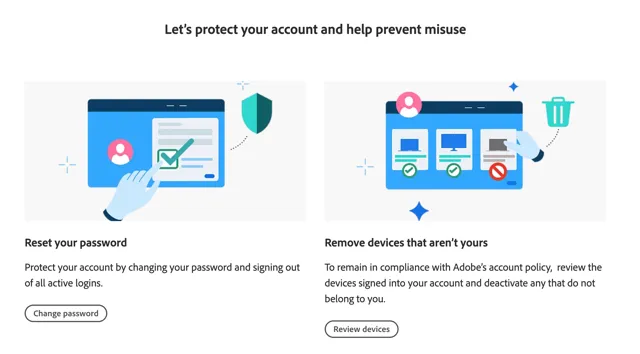
Since enforcement is stricter, users should periodically review which devices are activated. Premiere Pro, After Effects, and Photoshop will prompt you to deactivate a device when limits are exceeded, but proactively deactivating prevents workflow interruptions.
Alternatives for Budget-Conscious Creators
Stricter enforcement against account sharing may push some small studios or freelancers to explore pricing-friendly alternatives.
Tools like DaVinci Resolve (free and Studio), CapCut Pro, or Final Cut Pro offer high-performing editing environments without multi-seat restrictions. Many teams may choose hybrid workflows —Adobe for graphics and motion templates, and Resolve for color and finishing—to optimize licensing costs while staying compliant.
Conclusion
Adobe’s new measures against account sharing are part of a broader industry shift toward protecting subscription models and ensuring licensing accuracy. For creators, the key takeaway is that nothing changes in day-to-day work as long as login credentials belong to a single user and device limits are respected. Studios, on the other hand, should reassess their seat distribution and move to team-based licensing to avoid interruptions. With a few workflow adjustments, compliance becomes simple, and uninterrupted access to Creative Cloud remains guaranteed.




 Stock Photo Guides
 Photo Buyer Guide
 Vector Guru